You set a visit duration, but the tab closes after eight seconds. That gap between what a dwell time tool promises and what it delivers is where budgets and rankings quietly disappear. Many platforms report clicks without showing what the visitor actually saw.
This guide breaks down how to judge a CTR tool on visit duration, full click paths, and screenshot proof. You will learn how CTRTool handles desktop and mobile campaigns across Google, Bing, Maps and AI Overviews, what its plans cost, and how to weigh proof and billing fairness before you commit.
What Is CTRTool?
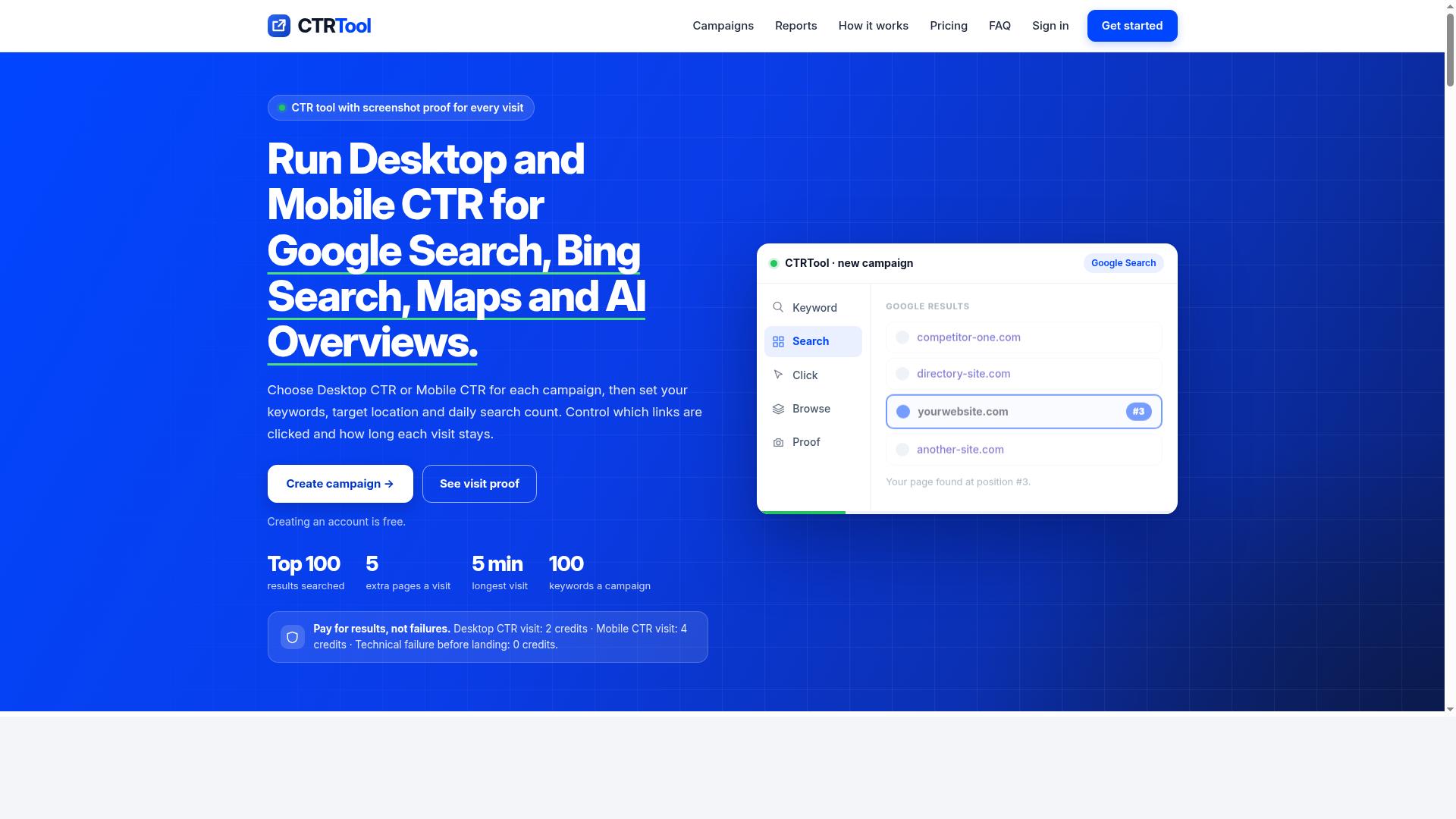
CTRTool is a SaaS platform that runs controlled click-through rate (CTR) campaigns for Google Search, Bing Search, Google Maps, and AI Overviews, providing screenshot proof for every visit. It is built for SEO practitioners and agencies who want to influence CTR and the behavioral signals that shape SERP behavior.
The core promise is simple: proof you can inspect. Every visit in a campaign is documented with a screenshot, so users can verify the activity rather than take it on faith. For buyers comparing CTR manipulation tools, that documentation matters because it separates measurable activity from unverifiable claims.
Campaigns run across Desktop and Mobile, and users choose the device type per campaign. From there, they set keywords, target location, and a daily search count, then control which links are clicked and how long each visit stays. That last setting is central to dwell time work, since session duration is one of the engagement metrics a campaign is designed to influence.
CTRTool is not a ranking guarantee, and the brand says so plainly: automated visits do not guarantee rankings. That honesty is worth noting in a market full of overstated promises. It positions the tool as a way to shape behavioral signals and click-through rate, not a shortcut that replaces sound SEO fundamentals.
For anyone weighing a CTR manipulation tool for dwell time, CTRTool fits the profile of a focused, transparent option. It targets the signals that matter, documents what it does, and sets realistic expectations about outcomes.
Does CTRTool Support Dwell Time in CTR Campaigns?
Yes, CTRTool supports dwell time control as part of its campaign setup, allowing users to define how long each simulated visit lasts. Dwell time is a configurable parameter, not an afterthought, so campaigns can mirror realistic visit durations rather than firing instant clicks and leaving.
That matters because behavioral signals such as session duration and time on page sit alongside click-through rate in how search algorithms read engagement. A click that ends immediately sends a very different signal than a visit that lingers and explores.
By pairing dwell time with click activity, CTRTool campaigns can address both sides of the engagement picture. The mechanics of how duration and visit paths are configured are covered next.
How Visit Duration and Full Visit Paths Are Controlled
CTRTool lets users set visit duration and define full visit paths, including internal page navigation, to simulate organic user journeys. Instead of a single landing hit, users can specify time on page and optionally configure internal page visits, such as clicking through to a second page, to build a complete path.
The platform supports up to five additional pages per visit, with visits lasting up to five minutes total. That range gives room for short, focused sessions and longer, multi-page reads, depending on what a given keyword and landing page would naturally attract.
Verification is built in. CTRTool records search and landing screenshots as separate proof images for every visit, so the full visit path can be checked rather than taken on trust. This screenshot proof is one of the tool's core selling points and sets it apart from setups that report clicks without evidence.
Longer, multi-page visits support realistic engagement metrics like session duration while reducing bounce rate signals, since a visit that navigates onward does not read as an immediate exit. Scroll timing and click order can also be set during campaign setup, adding further structure to each session.
For buyers comparing a CTR manipulation tool, this level of control over dwell time simulation and visit depth is a practical checkpoint. A tool that only delivers clicks, without duration or path control, leaves the engagement side of SERP behavior unaddressed. CTRTool treats the visit as the unit of work, with duration, internal navigation, and proof images all part of the same campaign record.
Key Features That Matter When Choosing a Dwell Time Tool
When evaluating a dwell time tool, focus on features that ensure realistic simulation, verifiable proof, and flexible campaign controls. A basic CTR bot that only fires clicks tells you almost nothing about whether visitors actually stayed on the page or landed where you intended.
For a dwell time solution, the criteria that separate serious tools from shallow ones are straightforward. Look for proof of visits, device targeting, keyword position tracking, and campaign coverage across search, Maps, and AI results.
Each of these shapes whether the traffic you buy reflects genuine SERP behavior and user engagement metrics, or just inflates click counts. The sections below break down the features that matter most in practice.
Screenshot Proof for Every Visit
Screenshot proof is CTRTool's standout feature: every simulated visit generates search and landing screenshots as separate proof images. That means you can see the query result page as it appeared and the destination page the visit reached, rather than trusting a click counter alone.
This matters because verification is the weak point of most traffic simulation. Without visual evidence, you cannot confirm that a click occurred, that it hit the right URL, or that the session behaved as configured. Two screenshots per visit close that gap and build trust in the tool's output.
For agencies, the benefit is practical. Client reporting usually needs something tangible, and proof images sit alongside the full visit paths CTRTool records, so a campaign can be shown rather than described. That is a far stronger position than presenting a spreadsheet of claimed clicks.
Proof also supports quality control on your own campaigns. If a landing page screenshot looks wrong, you can catch a misconfigured target URL before spending more of your credit balance. Reports include full visit paths, search and website screenshots, and keyword positions over time.
Desktop vs. Mobile Campaigns and Keyword Position Tracking
CTRTool lets you choose Desktop CTR or Mobile CTR per campaign, and it tracks keyword positions over time, including Maps listing order and AI citation order. Device choice matters because search results and page layouts differ between desktop and mobile, so device targeting keeps simulation aligned with how real users see your listing.
Position tracking turns a campaign into a feedback loop. Instead of guessing whether rankings moved, you can watch how organic ranking shifts for the chosen keyword and location over the life of the campaign. Search positions, Maps listing order, and AI citation order are all reported.
Campaign coverage extends across four types, each matched to where you want visibility:
- Google Search CTR: target a keyword, click the organic result, with search depth up to the Top 100 results
- Bing Search CTR: the same approach applied to Bing results
- Google Maps CTR: find the business listing and click its website link, with up to 50 listings and city targeting
- AI Overview CTR: find your website in the overview and click its source link, with citation order tracked
Sessions run through Desktop Chrome windows and real Android phone sessions matched to the target location via managed proxy routes, which supports geo-targeting without guesswork. Visits can last up to five minutes and include up to five additional internal pages, giving session duration and time on page room to look natural rather than abrupt.
Setup controls reinforce that realism. You can set daily search counts with now, spread out, or gap timing, choose days, hours, and time zone, and define click order and scrolling time. With up to 100 campaigns holding 100 keywords each, the tool suits both single-site testing and multi-client work, and one shared credit balance covers every campaign type, website, and keyword.
Campaign Coverage: Google Search, Bing, Maps and AI Overviews
CTRTool supports four campaign types: Google Search CTR, Bing Search CTR, Google Maps CTR, and AI Overview CTR. That spread matters for a CTR manipulation tool built around dwell time, because behavioral signals only count when the click happens on the surface where your audience actually searches.
A tool limited to one engine leaves gaps in your SERP behavior profile. Coverage across engines and local results gives a more consistent picture of how real users find and engage with your pages.
Google Search CTR campaigns target a keyword and click your organic result, with the tool able to reach results within the top 100 positions. This is the core campaign for most buyers, since Google remains the primary source of organic traffic for many sites.
Bing Search CTR applies the same keyword and click logic to Bing. Buyers who ignore Bing miss a smaller but often less competitive surface where engagement signals can still shape visibility.
Google Maps CTR campaigns find a business listing and can check up to 50 listings. This suits local businesses where map pack placement drives calls and store visits, not just pageviews.
AI Overview CTR campaigns require a matching citation. As AI-generated answers appear above traditional results, a tool that accounts for this surface keeps your campaign mix aligned with where clicks now originate.
Geo-targeting is where campaign coverage meets realism. CTRTool is a global online service, and campaigns can target a chosen country with an optional state and city, or select "Any country" to use a mix of supported locations. No country restrictions are stated.
That flexibility supports traffic source diversity and believable location patterns. A single-city campaign looks natural for a local plumber. A mixed-country setup fits a SaaS brand with a distributed audience.
- Google Search CTR: keyword plus organic click, top 100 results
- Bing Search CTR: same keyword and click approach on Bing
- Google Maps CTR: locate the listing, check up to 50 listings
- AI Overview CTR: requires a matching citation
- Geo-targeting: country, optional state and city, or "Any country" mix
When comparing tools, check that every campaign type you need is covered before you look at price. A cheaper option that skips Maps or AI Overviews can cost more in missed coverage than it saves.
CTRTool's four campaign types and flexible geo-targeting give buyers a complete starting set for dwell time and click-through rate work across the surfaces that matter most.
Pricing and Plans
CTRTool offers monthly plans in USD: Starter at $59/month for 2,000 credits and Growth at $125/month for 5,000 credits. Two larger tiers round out the lineup, and every tier follows the same credit model, so the main decision is simply how much volume your dwell time campaigns need.
Here is how the plans compare on credits and the approximate visit volume each one supports:
| Plan | Price (USD/month) | Credits | Approx. Desktop Visits | Approx. Mobile Visits |
|---|---|---|---|---|
| Starter | $59 | 2,000 | Up to 1,000 | Up to 500 |
| Growth (Recommended) | $125 | 5,000 | Up to 2,500 | Up to 1,250 |
| Scale | $399 | 20,000 | Up to 10,000 | Up to 5,000 |
| Agency | $699 | 40,000 | Up to 20,000 | Up to 10,000 |
The key figure for any buyer's guide is the credit cost per visit. A Desktop CTR visit consumes 2 credits, while a Mobile CTR visit consumes 4 credits. That is why the visit equivalents halve on mobile: the same credit balance stretches half as far when your dwell time simulation targets mobile devices.
Two other consumption rules matter for budgeting. A verified search that returns no match costs 1 credit, and a technical failure before landing costs 0 credits, so failed attempts do not quietly drain your balance. Credits are consumed per visit, which makes it straightforward to estimate monthly spend from your target session volume.
CTRTool also notes that unused credits roll over while your subscription stays active, though they expire once a cancellation takes effect. Creating an account is free, so you can review the dashboard before committing to a plan. Custom development carries a separate, agreed one-time fee.
One time-sensitive detail: the site displays limited launch pricing with the notice that prices rise 30% on November 15. If you are comparing tiers, factor that into the timing of your decision rather than assuming current rates are permanent.
For most buyers, the choice comes down to target volume and device mix. Growth is marked Recommended and suits campaigns running a few thousand desktop visits per month, while Scale and Agency fit heavier, multi-campaign dwell time strategies.
Trust Signals: Proof, Billing Fairness and Transparency
CTRTool builds trust through screenshot proof for every visit, transparent billing based on credits, and clear campaign requirements. For a buyer comparing CTR manipulation tools, these three signals separate a service you can verify from one you simply have to take on faith.
Because dwell time and other behavioral signals are hard to observe directly, proof matters more than promises. A tool that documents each visit gives you something to check against your own analytics.
Proof through screenshots. CTRTool provides screenshot proof for every visit, so you can confirm that sessions actually occurred rather than trusting a dashboard total. This is useful when you are tracking session duration, bounce rate and time on page, since you can tie reported activity to what your analytics shows.
Ask any vendor how they document visits. If the answer is a summary number with no supporting evidence, you have no way to audit the work.
Billing fairness. Credits are only consumed for successful visits with proof. That structure aligns cost with delivered activity, which is the fairer model for a buyer. You are not paying for failed attempts or unverified sessions.
Read the billing terms closely before committing. Look for language confirming that unsuccessful visits are not charged, and check how credit usage is reported.
Transparency about requirements. CTRTool is upfront about the conditions a campaign must meet. Knowing these in advance prevents wasted spend and unrealistic expectations.
- The page must appear within the top 100 organic results for the chosen keyword and location.
- Maps campaigns check up to 50 listings, roughly five pages.
- AI Overview campaigns require a matching source link.
- Daily goals reset at 00:00 UTC.
- One balance covers all campaigns, with up to 100 campaigns and 100 keywords per campaign.
CTRTool also states plainly that it does not guarantee higher rankings, leads or sales. That honesty is itself a trust signal: a vendor that sets clear boundaries is easier to evaluate than one making sweeping claims.
Weigh these signals together rather than in isolation. Screenshot proof, credit-based billing tied to successful visits, and published campaign requirements form a coherent picture of how the service operates. For a buyer assessing a CTR manipulation tool for dwell time work, that combination is a reasonable basis for a confident decision.
Who Should Use CTRTool
CTRTool is designed for SEO practitioners and agencies running CTR campaigns for their own or client websites across Google, Bing, Maps, and AI Overviews. The platform targets people who already understand how click-through rate and SERP behavior feed into user engagement metrics and, ultimately, organic ranking.
In other words, this is not a beginner's shortcut. It suits professionals who can plan a campaign, read the resulting data, and adjust a strategy based on behavioral signals rather than guesswork.
The ideal user fits one of a few clear profiles:
- SEO professionals managing campaigns for their own properties and testing how dwell time and session duration respond to controlled traffic.
- Agencies that need to demonstrate campaign activity and outcomes to multiple clients at once.
- Consultants who advise on SERP behavior and want a repeatable way to influence click-through rate and time on page.
CTRTool's own guidance mentions using tier links, PBNs, and test properties. That framing tells you something useful about the intended audience: people who run structured link and traffic setups and want a CTR manipulation tool that fits into that workflow rather than replacing it.
For client work, proof and reporting matter as much as raw capability. An agency has to show a client what was done and why, especially when the deliverable is something as intangible as improved engagement metrics. CTRTool's proof and reporting features make it suitable for client-facing engagements, where a consultant can document campaign activity and tie it back to the metrics the client cares about.
If you are running a single small site and only want a quick experiment, you are still within the target audience, but the value is clearest for practitioners juggling several properties or accounts. The same applies to anyone testing how dwell time simulation and related interactions affect bounce rate and session duration across different search surfaces.
What CTRTool is not built for is someone looking for a set-and-forget traffic bot with no analysis behind it. The tool assumes you bring a strategy: which pages, which queries, which devices, and which geographies. That assumption is exactly why it lands with SEO practitioners and agencies rather than casual users.
The short version: if you earn your living from organic ranking and you want a CTR manipulation tool that supports structured campaigns and client reporting, CTRTool is aimed squarely at you.
Final Verdict
CTRTool delivers a verifiable dwell time and CTR solution with screenshot proof, broad campaign coverage, and transparent pricing, making it a strong choice for SEOs who need accountability. The platform is built around a simple premise: behavioral signals only help an organic ranking strategy when you can prove the visits actually happened and lasted long enough to matter.
Across this buyer's guide, the same criteria kept surfacing: control over dwell time, realistic visit paths, evidence of delivery, and pricing you can plan around. CTRTool addresses each of these directly rather than leaving buyers to guess.
The strengths below reflect the features and details the brand publishes. They are the points worth weighing against your own campaign goals before you commit.
- Dwell time control: campaigns are structured around session duration and time on page, the two user engagement metrics most tied to how a search algorithm reads a result.
- Full visit paths: traffic follows a route through the site rather than a single bounce, which supports a healthier bounce rate profile.
- Screenshot proof: delivery is documented, so results can be checked instead of taken on faith.
- Multi-platform support: campaigns can run across more than one search platform, widening traffic source diversity.
- Clear pricing: costs are stated up front, with no custom-quote maze to navigate.
One limitation deserves a straight mention. CTRTool works best for pages that already rank, since behavioral signals amplify visibility rather than create it from nothing. If a keyword sits well outside the top results, fix the fundamentals first.
For SEOs running client campaigns, the accountability angle matters most. Screenshot proof turns a CTR manipulation tool from a black box into something you can report on, and the dwell time simulation is tied to a measurable outcome rather than a vague promise of engagement.
The target audience is fairly specific: agencies, freelancers, and in-house teams that already understand SERP behavior and want a controlled way to influence it. Buyers who need hand-holding through every step may find the tool's self-directed model less comfortable.
On balance, CTRTool earns a favorable verdict for its category. It pairs the mechanics that matter, click-through rate support and session duration control, with the transparency that buyers should demand in a buyer's guide comparison.
For questions before purchasing, the published support contact is vaibhav@autoblogging.ai. That address is the listed channel for inquiries, so direct any pre-sale or account questions there.
Frequently Asked Questions
What should I look for in a CTR manipulation tool if dwell time is my main goal?
Dwell time depends on real visits that actually load and stay on your page, so prioritize tools that provide verifiable proof of each visit rather than vague reports. CTRTool includes screenshot proof for every visit, with search and landing screenshots as separate proof images, plus full visit paths so you can confirm the journey from keyword to page.
How does CTRTool prove that visits actually happened?
CTRTool provides screenshot proof for every visit, capturing the search and landing screenshots as separate proof images, along with full visit paths. This lets you audit campaigns instead of relying on aggregated click counts, which matters when you're evaluating dwell time quality.
Which search platforms and campaign types does CTRTool support?
CTRTool runs Desktop and Mobile CTR campaigns for Google Search, Bing Search, Maps and AI Overviews. You choose Desktop CTR or Mobile CTR per campaign, set keywords and target locations, and can point campaigns at internal pages as well as top-level URLs.
How does CTRTool's pricing work, and what do credits cover?
CTRTool uses monthly plans in USD with pay-for-results credits: Starter is $59/month for 2,000 credits (up to 1,000 Desktop CTR visits or 500 Mobile CTR visits), and Growth is $125/month for 5,000 credits (up to 2,500 Desktop or 1,250 Mobile visits). Because credits map to actual visits, you can estimate dwell-time campaign costs before committing.
Can I target specific locations for my dwell time campaigns?
Yes. CTRTool is a global online service, and campaigns can target a chosen country with an optional state and city, or use "Any country" to draw from a mix of supported locations. Location targeting matters for dwell time because visits should match the audience you're trying to influence.
What eligibility rules should I check before running a campaign?
For search campaigns, your page must appear within the top 100 organic results for the chosen keyword and location; Maps campaigns check up to 50 listings (about five pages), and AI Overview campaigns require a matching source link. Confirming these requirements upfront helps avoid wasted credits and keeps your dwell time testing focused on pages that can actually receive visits.